Many people now search Instagram the way they search Google. They type "bridal lehenga Ahmedabad" or "home bakery Surat" and browse the results. Instagram SEO means setting up your profile and posts so they appear in those searches, and then giving people a reason to follow or message you.
Most of it is free and quick. The work is in putting the right words in the right places. This guide covers the profile (name field and bio), posts and Reels, and hashtags.
Where Instagram reads your words
Instagram matches searches against several parts of your account:
- Username (@shreetextiles)
- Name field, the bold name on your profile
- Bio
- Captions, especially the first lines
- Hashtags
- Text on Reels and spoken words, which Instagram can read and transcribe
- Alt text on images
- Location tags
The username and name field matter most for being found as an account. Captions, on-screen text and hashtags matter most for individual posts.
The name field
The name field is the bold name above your bio. It's searchable and separate from your username, and most businesses waste it by repeating the brand. Add what you do and where:
Brand | What you do + City
Shree Textiles | Silk Sarees SuratBhanderi Buildcon | Builders AhmedabadDr. Kavya Mehta | Dentist VadodaraCrumbs & Co | Eggless Cakes Rajkot
If you sell across India, swap the city for your main product detail: Loom Story | Handloom Cotton Sarees. Instagram limits the number of characters and how often you can change the name, so decide carefully.
Your username is searchable too, but changing it confuses followers and breaks old links. Keep it stable once set.
The bio
The bio is limited to 150 characters. Three short lines usually work best:
- What you offer, in customer words, with a key detail
- Proof or location: city, years in business, delivery area or a credential
- A call to action: your link, DMs or WhatsApp
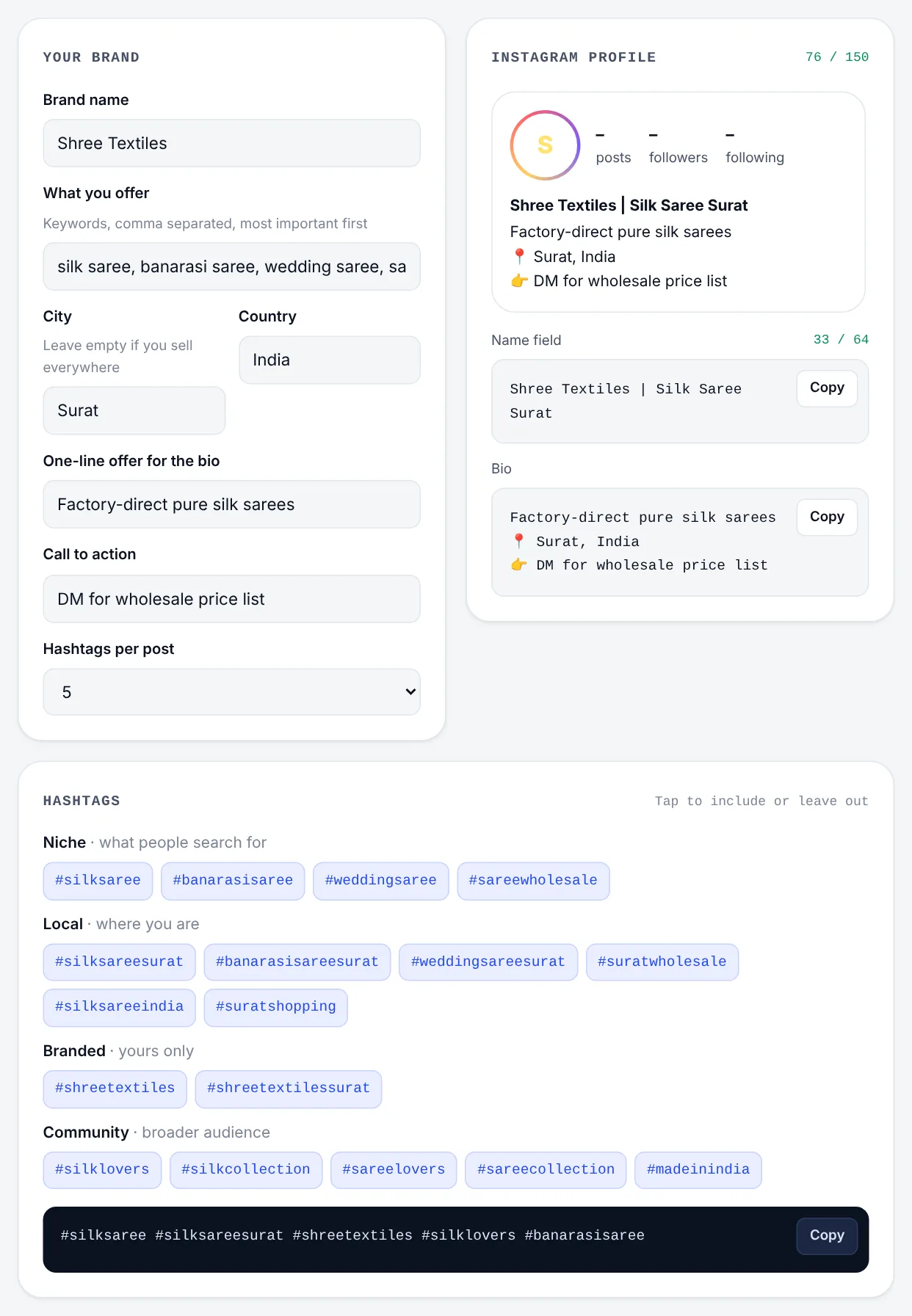
Bio examples by business type
Manufacturer or wholesaler
Factory-direct pure silk sarees since 1998
📍 Surat · Ships across India
👉 DM "PRICE" for the wholesale list
Service business
House construction & renovation, on time
🏗 120+ homes built in Ahmedabad
📞 Free site visit, tap Call
Clinic
Painless dental care for the whole family
📍 Alkapuri, Vadodara · Open Sundays
🗓 Book your appointment below
Home bakery
Eggless custom cakes & dessert boxes
📍 Rajkot · Same-day delivery before 2 pm
👇 Order on WhatsApp
Online tool
Find any IP address location, free
⚡ City, ISP and map in one click
🔗 Try it at the link below
Emojis make a bio easier to scan when you use them as signposts. One per line is plenty. Only claim what's true: "since 1998" and "120+ homes" should be real numbers.
The rest of the profile
- Link: point it at the page that matches your call to action, such as a WhatsApp chat, catalogue or booking page, not always the home page.
- Category: choose the business category that fits best. It shows under your name.
- Contact buttons: call, email, WhatsApp and directions.
- Story highlights: products, prices, reviews, FAQs and how to order. They work like menu tabs.
- Pinned posts: your best introduction, a customer review and your current offer.
Captions and Reels
Lead with the keyword
Write captions the way people search. Instead of "New arrivals! 😍", try "New Banarasi silk sarees for the wedding season, handwoven in Varanasi". The first line also shows in the feed before "more", so it has to work for people too. A caption written only for search reads like spam, and people scroll past.
Say it and show it in Reels
Instagram reads on-screen text and transcribes speech in Reels. If your Reel is about how to drape a silk saree, say those words and put them on screen in the first seconds. Add captions, which also help the many people watching without sound. If your customers speak Gujarati or Hindi, Reels in those languages often face less competition. See the Hindi and Gujarati keywords guide.
Alt text and location
- Before posting, open Advanced settings and write alt text that describes the image: "Red Banarasi silk saree with gold zari border". It helps accessibility and search.
- Tag your city or area. Local searchers browse location pages.
Hashtags in 2026
The old advice was thirty hashtags on every post. That's over. Instagram has been cutting the number of hashtags it allows and says they mainly help it understand what a post is about. Used well, they help the right people find you. Used badly, they make posts look like spam.
How many
The exact limit has changed several times, so check what the app allows when you post. In practice, three to five well-chosen hashtags are enough. Relevance matters far more than quantity.
Four kinds to mix
- Niche tags for exactly what the post shows:
#banarasisaree,#bathroomwaterproofing,#egglesscake - Local tags for where you are:
#suratfashion,#ahmedabadfood,#vadodarahomes - A branded tag that's yours alone:
#shreetextiles. Customers can use it too. - Community tags for a wider related audience:
#handloomlove,#madeinindia
A good set for a saree post: #banarasisaree #silksaree #suratfashion #shreetextiles #handloomlove.
Choosing good tags
- Search the tag first. If the top posts don't match your content or audience, skip it.
- Avoid huge generic tags like
#love,#instagoodor#fashion. Millions of posts bury yours instantly. - Avoid tags nobody uses.
- Avoid restricted tags. If a tag's page shows only a few posts or a warning, it has been limited because of spam.
- Match your customers' language. Hindi, Gujarati or Hinglish tags can reach local audiences with less competition.
Rotate sets, and put them at the end
Keep three or four sets for your main kinds of post (new arrivals, behind the scenes, customer photos, tips) and use the one that fits. The same block on every post for months looks automated. Put hashtags at the end of the caption, after the real text. The caption is safer than the first comment, because it's indexed with the post from the moment it goes live.
Getting found on Google too
Instagram lets search engines such as Google show public posts from professional accounts. If you want this, check your privacy settings and keep the account public. Keyword-rich captions then help in both places.
What keeps you in the results
Keywords get you into search results. How people react keeps you there: saves, shares, comments, watch time on Reels, and follows from your profile. Post regularly, reply to comments and DMs, and make content people want to keep.
Habits that limit reach:
- the same hashtags on every post
- hashtags unrelated to the post, added because they're popular
- engagement pods and follow-for-follow tags
- buying followers, which damages how Instagram rates your account
Checklist
- Keyword and city in the name field
- A three-line bio: offer, proof or location, call to action
- A link that matches the call to action
- The keyword in the first line of each caption
- Spoken and on-screen keywords in Reels, with captions
- Three to five relevant hashtags, rotated, at the end of the caption
- Alt text and a location tag on every post
The Rankdesk hashtag generator builds the name field, bio, hashtag groups and YouTube tags from your brand, keywords and city in one go. For video, read the YouTube SEO guide next.