"How much traffic does this website get?" is one of the most common questions in SEO. You might be sizing up a competitor, checking a site before buying a link or an ad, or trying to understand your own numbers.
The honest answer has two parts. For someone else's website, nobody outside the company knows the exact number, so every tool gives an estimate or a related signal. For your own website, you can know almost everything, for free, from two Google tools. This guide covers both, plus a newer question: how many of your visitors come from AI assistants like ChatGPT.
Why exact traffic is private
A website's visits are recorded by its own analytics: Google Analytics, a server log or a similar tool. Only the owner can see that data. Anyone else is working from outside.
Paid tools such as Similarweb and Semrush estimate visits for any site. They combine data from browsing panels (people who share their browsing through apps and extensions), data bought from partners, and models based on search rankings. Their estimates are useful for comparing big sites and spotting trends. For small sites with a few thousand visits a month, they can be far off, sometimes by several times, because so few panel users visit them.
So treat any number for someone else's site as a rough size, not a fact, and compare sites using the same tool rather than mixing tools.
Free signals for any website
When you can't see visits, you can still see how popular a site is compared with others. Four free sources each show a different side. They're what the "Any website" report in Rankdesk's website traffic checker is built on.
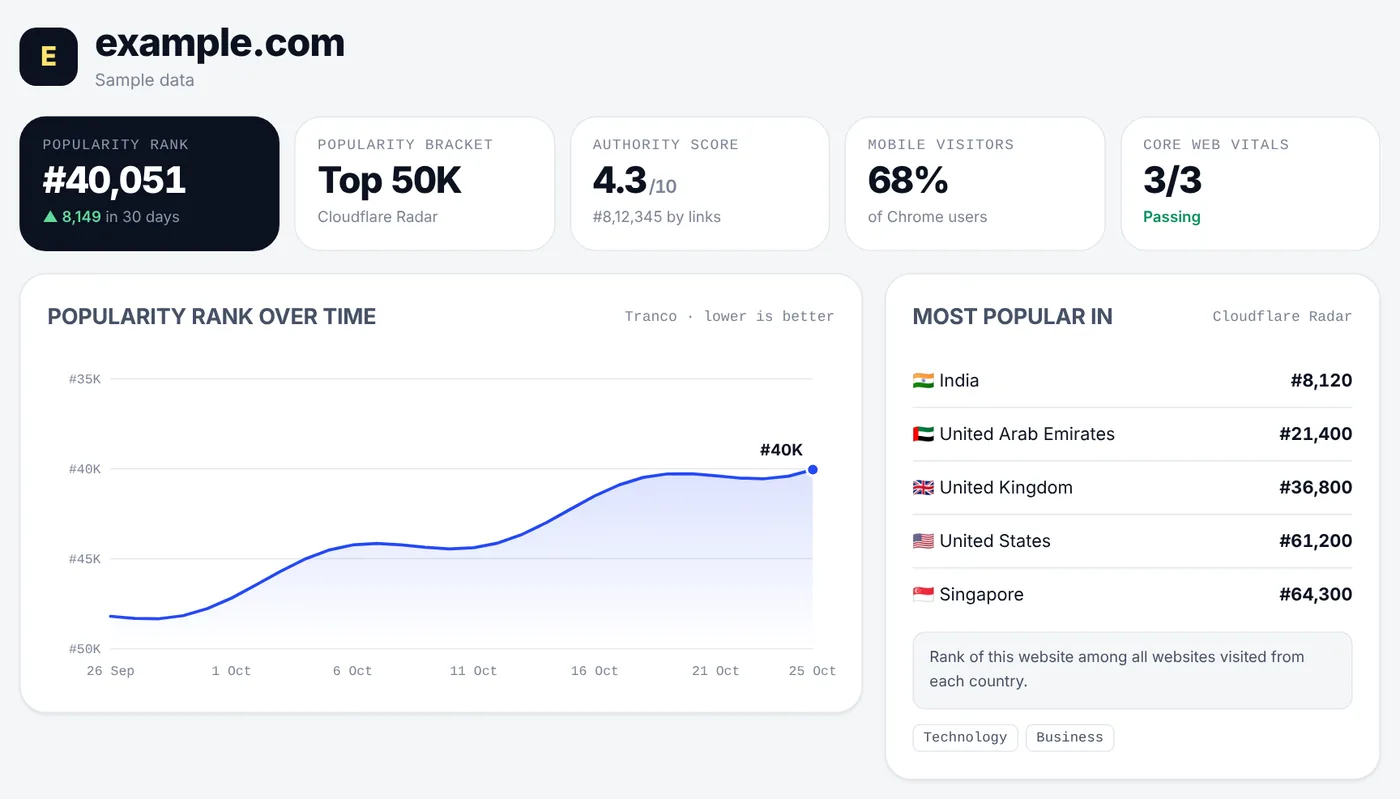
Popularity rank (Tranco)
Tranco is a top-sites list made by university researchers for studies of the web. It combines several popularity lists and averages them over 30 days, so a single spike doesn't move it much. A rank of 40,000 means about 39,999 sites are more popular.
- Good for: comparing a handful of competitors, and seeing whether a site is growing or shrinking over months.
- Limits: it only covers roughly the top million sites. Most small business sites aren't in it, and that's normal, not a bad sign.
On a rank chart, lower is better, so a line going up the chart means the site is getting more popular.
Popularity by country and category (Cloudflare Radar)
Cloudflare handles a large share of the world's web traffic, and its Radar service publishes which domains are most popular, in which countries, and which categories they belong to. For big sites it also gives a popularity bracket, such as top 50,000.
- Good for: seeing where a site's audience is. A site ranked well in India but not in the US is clearly serving Indian visitors.
Mobile share and Core Web Vitals (Chrome UX Report)
Google's Chrome UX Report collects anonymous data from real Chrome users who've agreed to share it. For any site with enough visitors, it shows how visits split between phones, desktops and tablets, and how fast the site feels (the same Core Web Vitals Google uses for rankings).
- Good for: knowing whether a competitor's audience is mostly on phones, and whether their site is faster or slower than yours.
- Limits: small sites often don't have enough Chrome visitors to appear.
Authority score (Open PageRank)
Open PageRank scores domains from 0 to 10 based on the links pointing to them, using public crawl data. It isn't traffic, but sites with many strong links usually get more visitors, and it gives every site a number, even small ones.
What these signals can't tell you
None of them gives visits, keywords, traffic sources or conversions for someone else's site. For those, you need to be the owner.
Your own website: the full picture, free
For your own site, two free Google tools answer almost every traffic question.
Google Search Console: what people searched
Search Console shows how your site appears in Google search:
- Clicks: visits from Google search.
- Impressions: how often your pages appeared in results.
- Average position: where you usually appear. Lower is better, and 1 is the top.
- Queries: the exact searches people used. This is the most useful report in SEO, because it shows the words real people typed to find you.
- Pages and countries: which pages and which countries those clicks came from.
Google Analytics: every visit, from everywhere
Google Analytics 4 records every visit, not just those from Google search:
- Sessions and users over time.
- Channels: organic search, direct, social, referral, paid and email.
- Sources: the individual sites that sent visitors, such as google, instagram.com or chatgpt.com.
- Countries, cities and devices.
- Landing pages: where visits start.
Both in one report
Rankdesk's website traffic checker can show your own Search Console and Analytics data together. Choose My website, sign in with Google, and pick your site and Analytics property. You get visits over the past year, Google clicks and average position, traffic sources, top 5 countries, top keywords and AI traffic in one page, with a CSV download.
The access is read-only: Rankdesk asks only for permission to view Search Console and Analytics, and can't change anything. Your sign-in is kept in an encrypted cookie in your own browser, and the data isn't stored on Rankdesk's server. You can sign out at any time, and remove access from your Google account settings.
AI traffic: visitors from ChatGPT and other assistants
AI assistants now send real visitors to websites. When ChatGPT, Perplexity, Gemini, Copilot or Claude cites a page and someone clicks the link, Google Analytics records the visit with the assistant's website as the source, such as chatgpt.com or perplexity.ai.
To see yours in Google Analytics, open Reports, then Acquisition, then Traffic acquisition, set the dimension to Session source, and search for chatgpt, perplexity, gemini, copilot and claude. Rankdesk's report does this automatically and groups the results by assistant and month.
Two things are worth knowing:
- Some AI visits look like direct traffic. Apps don't always pass on where a visitor came from, so the true number is usually somewhat higher than what you see.
- Nobody can see the prompts. AI assistants don't share what people typed with websites, and no tool, free or paid, can show you real prompts for your site. What you can see is which pages AI visitors land on. That tells you which of your content assistants recommend, and that's the content to improve and expand.
How to read traffic charts without fooling yourself
- Ignore the current month. A month that isn't over always looks like a drop. Rankdesk's charts only show complete months for this reason. I added that rule after the first version made every report look like traffic had crashed in the latest month.
- Compare like with like. Compare October with last October, not with a festival month. Many Indian businesses have strong seasons around Diwali and the wedding season.
- Look at clicks and impressions together. Impressions up and clicks flat means you're showing up more but not winning the click. Rewrite titles and descriptions. Both down means you're losing rankings. Audit the pages that dropped.
- Average position can rise when things get better. When a page starts appearing for many new searches at position 30, the average position gets worse even though you're getting more visibility.
- Watch the search terms, not just totals. One new query bringing buyers is worth more than a hundred random visits.
What to do with the numbers
- For competitors: check their popularity rank and countries every few months. If one grows fast, look at what they publish and how their pages are structured.
- For your site: each month, find searches where you're on page two (position 11 to 20) and improve those pages. They're the quickest wins.
- For AI traffic: look at the pages AI visitors land on and make them clearer and more complete, with direct answers near the top.
- For everything: write down what you changed and when, so you can match changes in traffic to what caused them.
Start with the website traffic checker. For a step-by-step plan to grow those numbers, see SEO for small businesses in India.